Download WiiM Volume 1.8.1
Download for macOSUniversal Binary · Intel & Apple Silicon · Free · 13 languages
What is WiiM Volume?
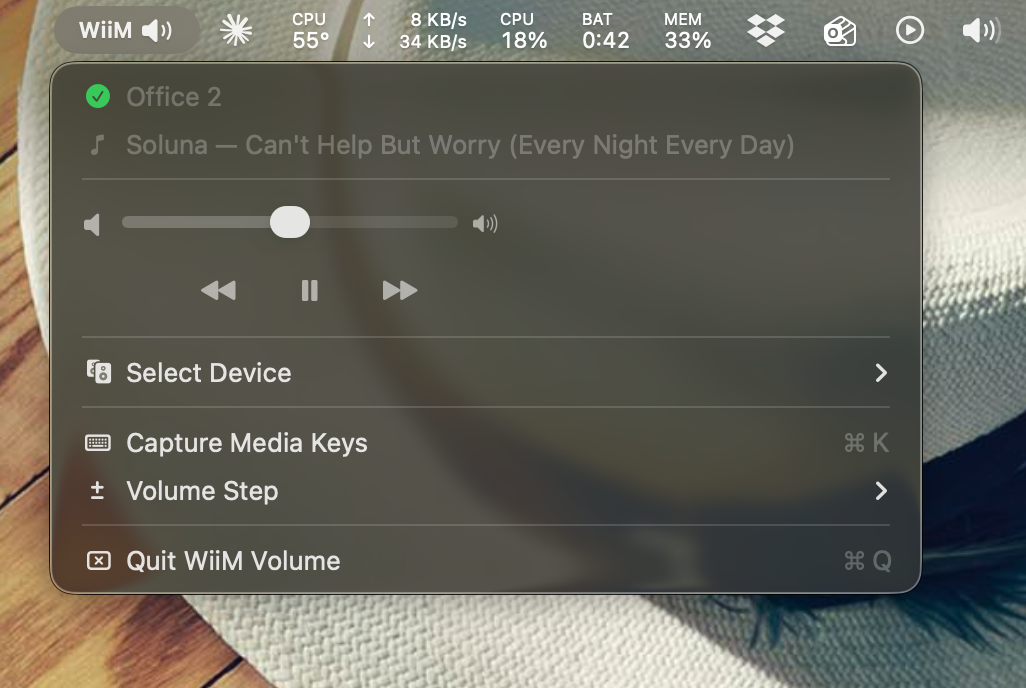
WiiM Volume is a free, native macOS menu bar app that lets you control any WiiM speaker (WiiM Mini, WiiM Pro, WiiM Pro Plus, WiiM Amp, or WiiM Ultra) directly from your Mac. Adjust volume with the keyboard's media keys, see what's playing without opening the WiiM Home app, and control multiroom groups with a single slider.
Features
- Menu bar volume control with slider
- Media key capture with per-key control: capture only the volume keys and leave play/pause & skip to your Mac (great for optical/HDMI input)
- Now Playing integration: control WiiM from Control Center, AirPods, Apple Watch, and Touch Bar, with album art and scrubbing
- Speaker Group panel (⌘G): link and unlink speakers, per-speaker volume
- Modern volume HUD with Liquid Glass effect (macOS 15+)
- Automatic device discovery via Bonjour & SSDP
- Track title in the menu bar (optional, with adjustable width)
- Now-playing track with album art in the menu
- Multiroom group volume control
- Auto-switch media-key capture based on macOS audio output
- Available in 13 languages (English, Dutch, German, French, Spanish, Italian, Portuguese, Danish, Greek, Japanese, and Chinese) with an in-app language picker
- Launch at Login via Apple's modern SMAppService
- Automatic updates via Sparkle
What's New
1.8.1
- Fix for updating on macOS 26 Tahoe. Installing an update could stop with "An error occurred while running the updater". The Sparkle update framework is now 2.10.0, which fixes this. If you see that error, download this version once and replace the app; later updates install normally.
1.8.0
- WiiM Volume now speaks your language. The app is available in 13 languages: English, Dutch, German, French, Spanish (Spain and Latin America), Italian, Portuguese (Brazil), Danish, Greek, Japanese, Simplified Chinese, and Traditional Chinese. It follows your Mac's language automatically, and so does the desktop widget.
- Language picker. Settings → General → Language pins the app to one language regardless of the system setting; the app relaunches to apply it.
- The About window now shares its layout with Settings → About, so longer translated text never gets cut off.
1.7.1
- Fix: with auto-switch enabled, editing a device's capture checkbox in Settings → Audio Output no longer gets reverted or stamps the wrong device's preference.
- Fix: the capture checkbox for the currently active output can be changed and takes effect immediately.
- "New outputs start unticked" option in Settings → Audio Output. Newly connected audio devices start with capture off until you say so.
1.7.0
- Per-key media capture. Settings → General → Media keys now has a checkbox per key (volume up/down, mute, play/pause, next, previous). Uncheck the playback keys and they pass straight through to macOS, ideal on optical or HDMI input, where the volume keys should drive the WiiM while play/pause keeps controlling Spotify or Music on your Mac.
- When no playback key is captured, WiiM Volume also steps out of Control Center and AirPods Now Playing, so those controls reach the app that's actually playing.
- Fix: track metadata with XML escapes now displays correctly ("Drum & Bass" instead of "Drum & Bass"), and album art with escaped URLs loads again.
- Fix: the menu bar track title follows light/dark appearance changes.
1.6.0
- Now Playing everywhere. WiiM playback shows up in macOS Now Playing: play, pause, skip, and scrub from Control Center, AirPods (double-tap), Apple Watch, and the Touch Bar, with per-track album art.
- Speaker Group panel (⌘G): link and unlink WiiM / Linkplay speakers around the connected device, with an independent volume slider per speaker.
- Device menu icons now use the macOS Sound-panel style.
1.5.x
- Show in Dock toggle (off by default); clicking the Dock icon opens Settings.
- Fix: packaging issue that could break the code signature on first launch (1.5.1).
1.4.x
- Copy the playing track to the clipboard: click the Now Playing menu item, or ⌥-click the track name in the menu bar.
- Fix: medium widget rendered blank in fullColor mode (1.4.2); manual capture toggle no longer fights the audio-output auto-switch (1.4.1).
Full release notes live in the Sparkle appcast.
System Requirements
A WiiM device (Mini, Pro, Pro Plus, Amp, or Ultra) on the same local network.
Liquid Glass HUD requires macOS 15 or later.
Installation
- Download and unzip the app.
- Drag WiiM Volume.app to your Applications folder.
- Launch it, then grant accessibility permissions when prompted (needed for media key capture).
- Select your WiiM device from the menu bar.
Updates
WiiM Volume checks for updates automatically via Sparkle. You can also check manually from the menu: Check for Updates…. Release notes are published in the Sparkle appcast.
Frequently Asked Questions
Is WiiM Volume free?
Yes. WiiM Volume is free to download and use.
Which languages does WiiM Volume support?
English, Dutch, German, French, Spanish (Spain and Latin America), Italian, Portuguese (Brazil), Danish, Greek, Japanese, Simplified Chinese, and Traditional Chinese. The app follows your Mac's language, or you can pick one in Settings → General → Language.
Which WiiM devices are supported?
Any WiiM device discoverable on your local network via Bonjour or SSDP, including WiiM Mini, WiiM Pro, WiiM Pro Plus, WiiM Amp, and WiiM Ultra.
Does it work on Apple Silicon?
Yes. WiiM Volume ships as a Universal Binary that runs natively on both Apple Silicon and Intel Macs.
Why does it ask for accessibility permission?
Accessibility access is required to capture the keyboard's media keys (volume up/down, mute, play/pause, skip) before macOS routes them elsewhere. You can choose exactly which keys are captured in Settings. WiiM Volume does not record keystrokes.
Support
Questions, feedback, or bug reports? Join the discussion on the WiiM community forum: WiiM Volume thread.
License & Disclaimer
WiiM Volume is free to download and use, but it is not open source. Redistribution, modification, repackaging, and reverse engineering are not permitted. See the full license for details.
Not affiliated with WiiM. WiiM Volume is an independent, unofficial macOS utility built by VK Apps. It is not affiliated with, endorsed by, sponsored by, or otherwise associated with Linkplay Technology Inc., WiiM, Tidal, or Apple Inc. “WiiM”, “Linkplay”, “Tidal”, and “AirPlay” are trademarks of their respective owners and are used here for descriptive and interoperability purposes only.